Deriving Graphics Coordinate Transforms on Scratch Paper
0. Background
Graphics coordinate transformation is the process of transforming 3D model-space coordinates into 2D screen coordinates. Both rasterization and ray-tracing renderers rely on this transformation. Mastering coordinate transforms is fundamental to understanding the graphics rendering pipeline.
I had implemented several rasterizers before, even a simple one on FPGA, but most of my work focused on code. Whenever I reached the mathematical derivation, I tended to skip it out of fear. As a result, I never really felt confident about coordinate transforms.
So, to strengthen my graphics foundation, I used this vacation to derive the whole process on scratch paper and try to make it understandable.
After finishing this mathematical derivation, I plan to write a corresponding rasterization renderer, ideally mostly handwritten.
1. Overview
The whole coordinate transformation process mainly consists of the following matrix transforms:
- 3D homogeneous coordinates, plus 3D translation and rotation
- Object space to world space transform matrix
- World space to camera space transform matrix
- Camera space to projection space, also called clip space or homogeneous clip space, transform matrix
- Clip space to screen space transform matrix
If you feel your understanding of linear algebra is weak, you can first watch 3Blue1Brown’s Essence of Linear Algebra. Understanding matrices as spatial transformations is enough for this article.
2. Derivation Process
2.1 3D Homogeneous Coordinates, Translation, and Rotation
Transforming into world space and camera space is essentially the process of translating and rotating points in 3D space. So we first introduce translation matrices, rotation matrices, and the homogeneous coordinates needed for translation. This part is relatively simple.
2.1.1 3D Homogeneous Coordinates
3D homogeneous coordinates add one more dimension to the original 3D vector, turning it into four dimensions: (x, y, z, w). This extra dimension is needed because multiplying a 3D vector by a 3D square matrix can only scale and rotate the vector. To support translation, homogeneous coordinate w is added.
2.1.2 3D Translation Matrix
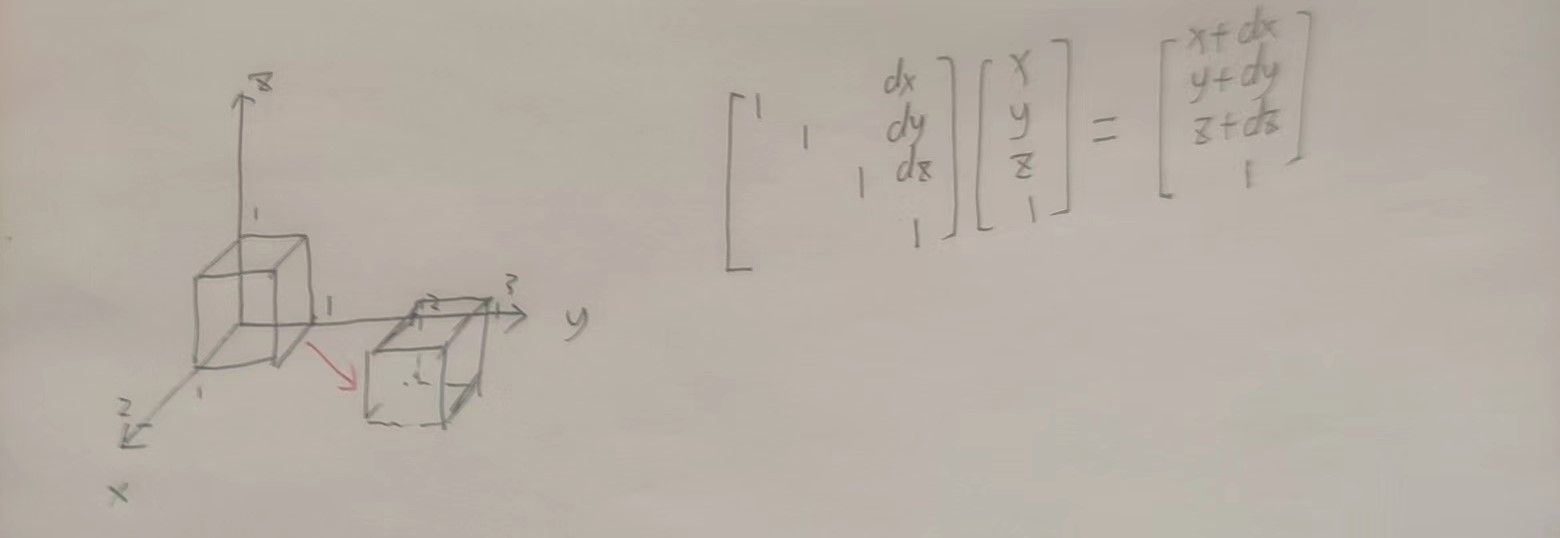
For an original coordinate (x, y, z, 1)^T, left-multiplying by a translation matrix performs translation, as shown below.
2.1.3 3D Rotation Matrix
As shown in the left-handed/right-handed 3D standard coordinate-system diagram below, matrices for rotating around a fixed axis by a fixed angle are shown here. Pay attention to the rotation direction.
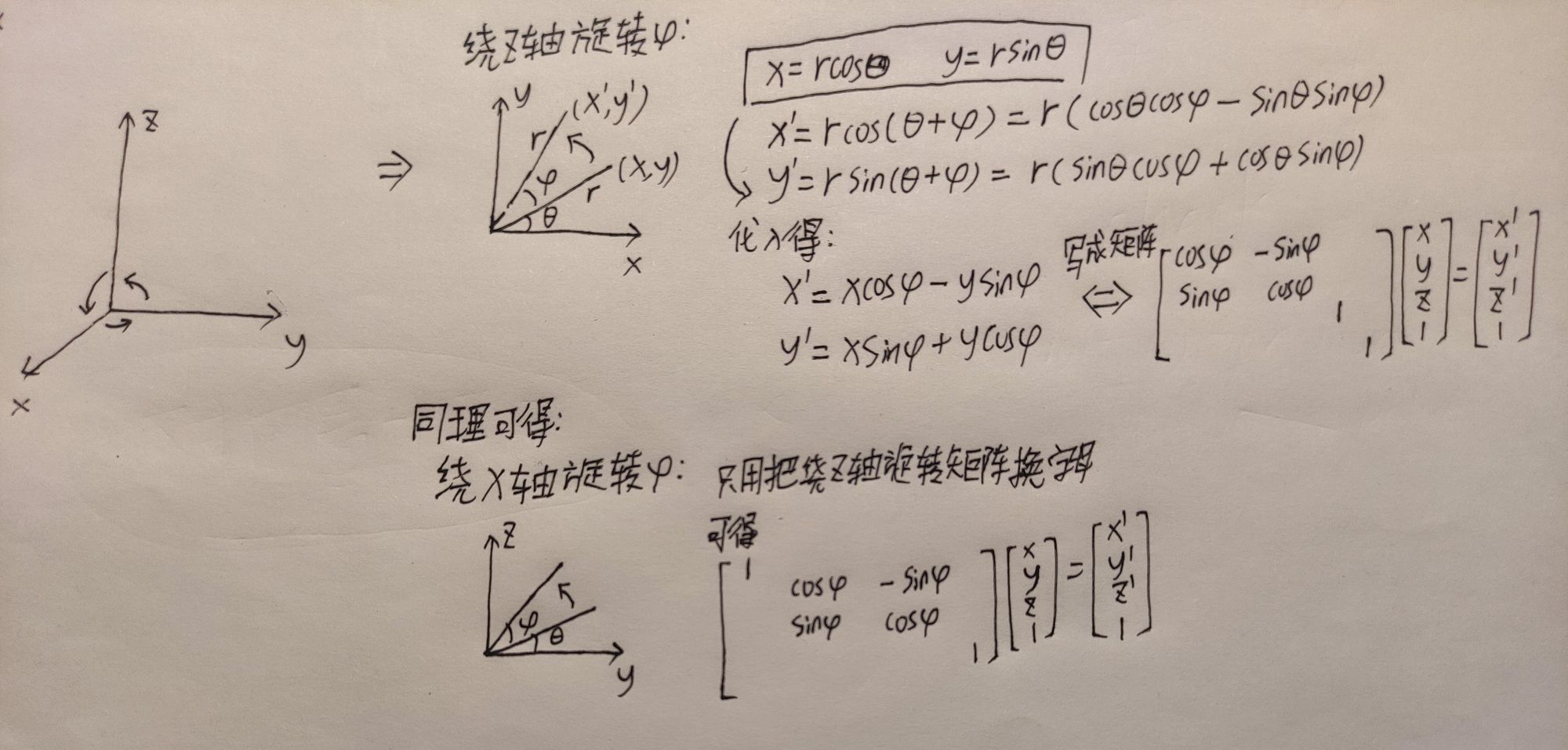
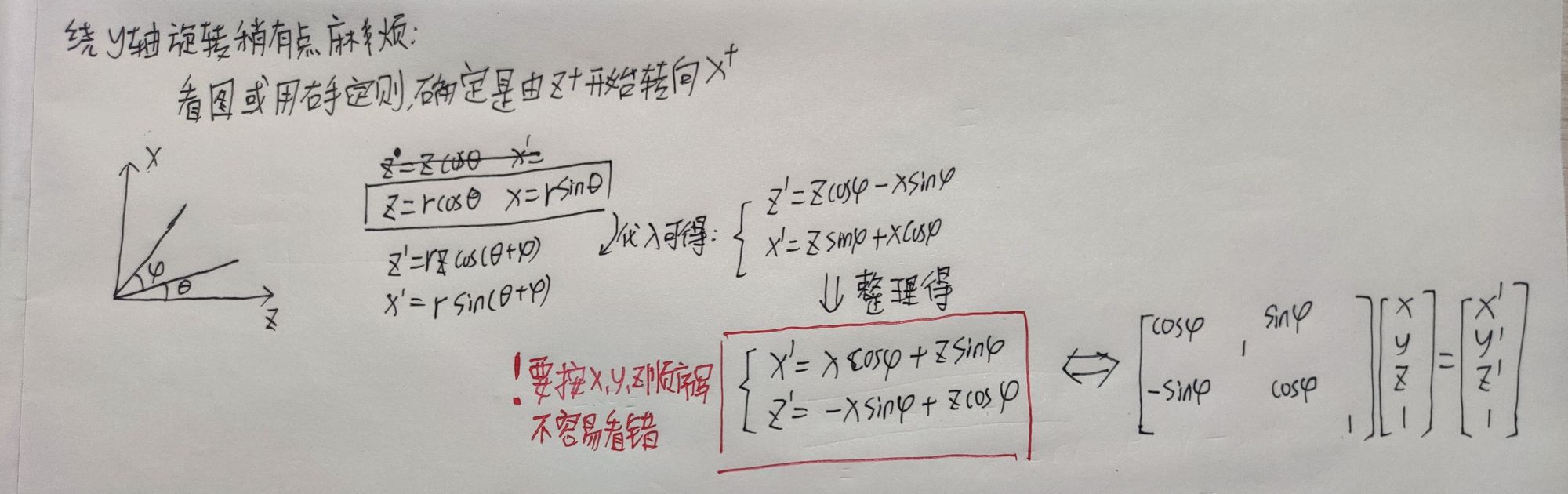
Because coordinates become four-dimensional, the rotation matrix that originally only needed to be 3x3 becomes a 4x4 matrix for easier computer implementation.
2.1.4 3D Scaling Matrix
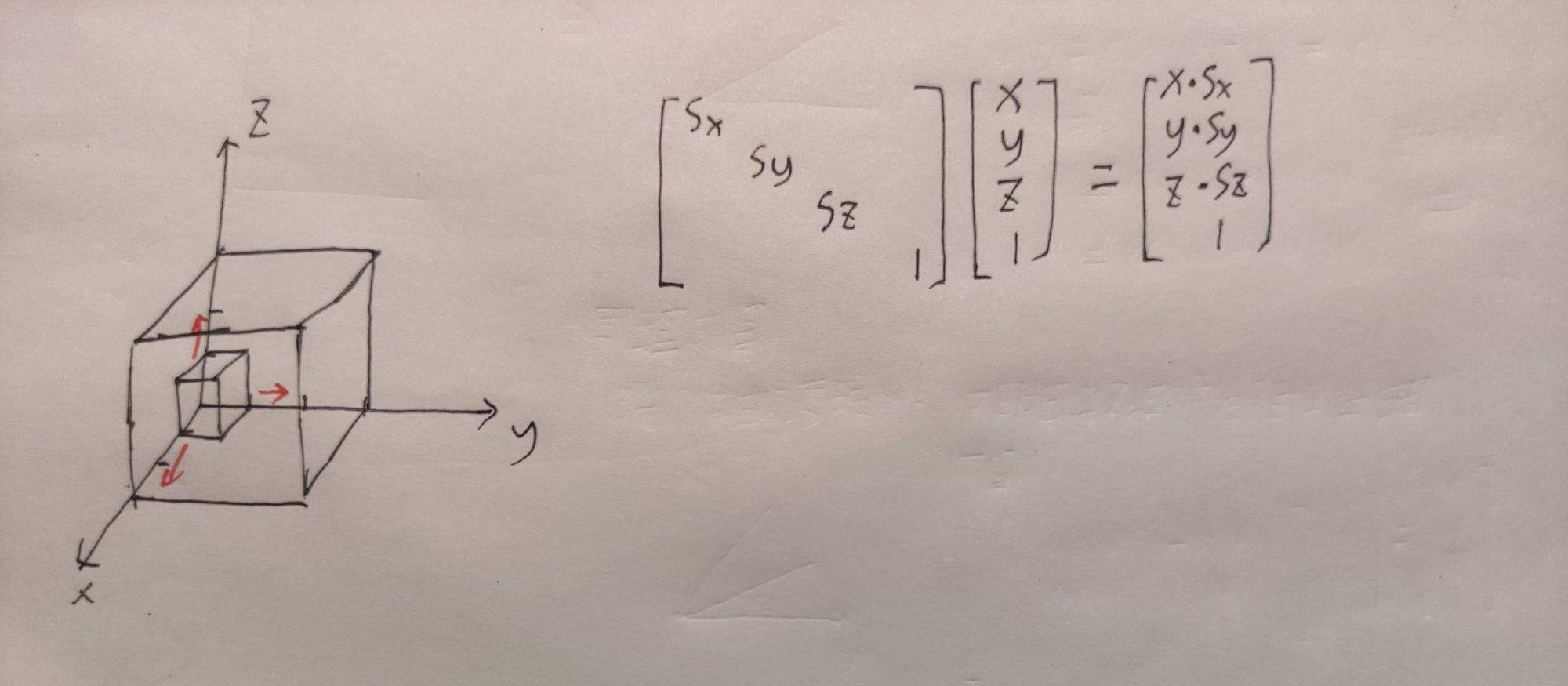
The scaling matrix is simpler, as shown below.
2.2 Object Space to World Space Matrix
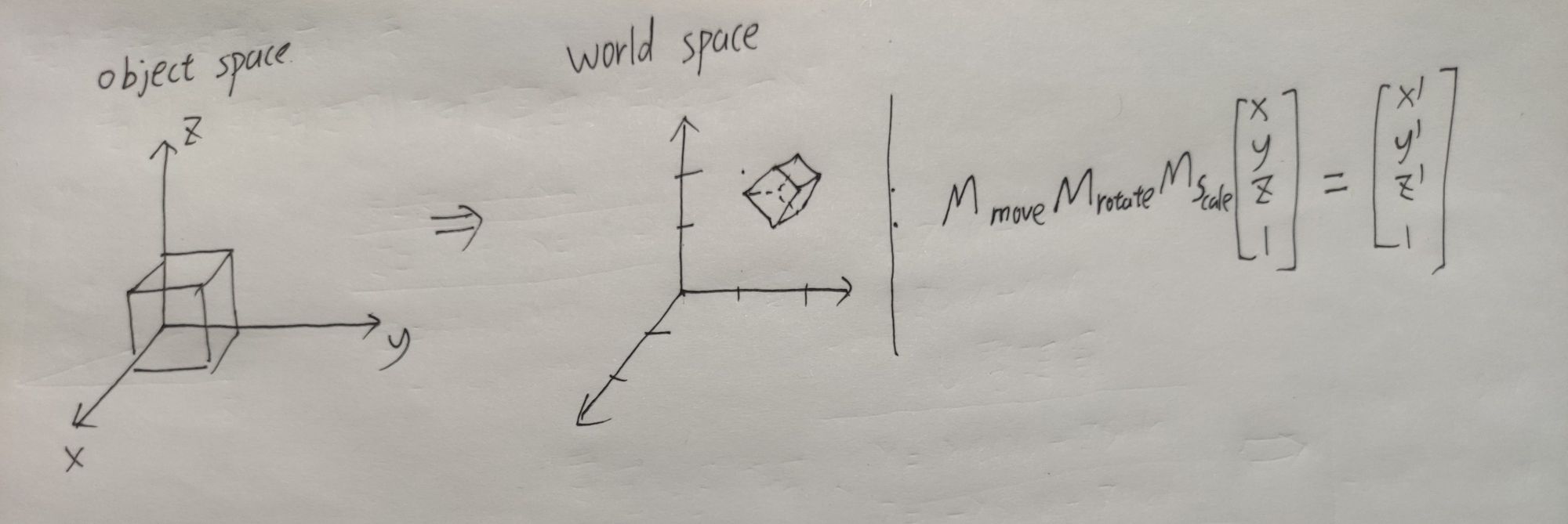
Coordinates in object space can be transformed into world coordinates by left-multiplying the translation, rotation, and scaling matrices introduced in section 2.1. This step is easy to understand.
One thing to note: if vectors are written vertically as I do here, the transform matrix must left-multiply the vector, and the calculation order is from right to left. In the diagram, the object is scaled first, then rotated, then translated.
2.3 World Space to Camera Space
The world-to-camera-space transform, also called the observer-space transform, consists of two steps:
- Determine the basis vectors of camera space.
- Solve the transform matrix from world space to camera space.
2.3.1 Determining the Camera-Space Basis
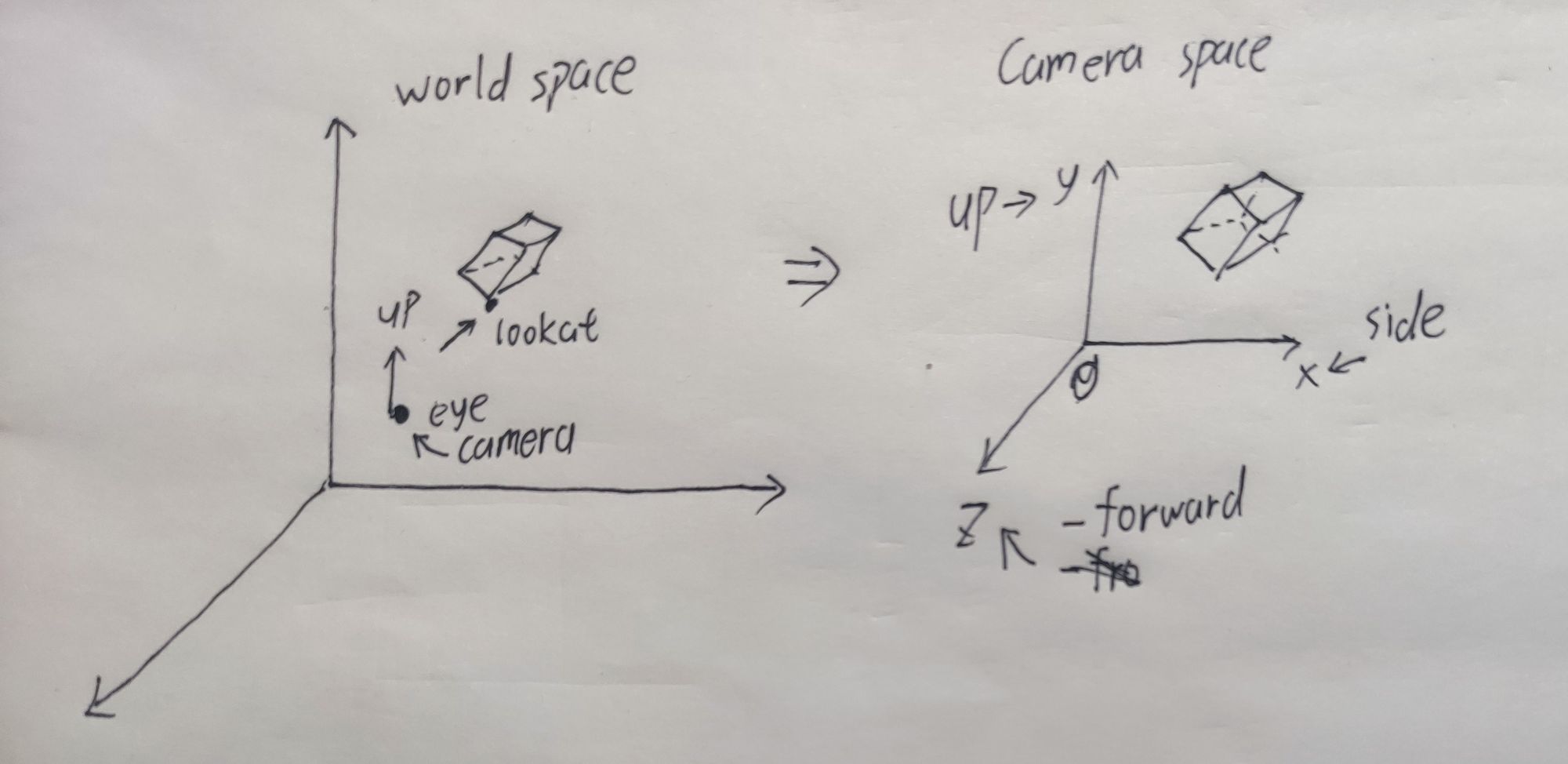
To place a camera in 3D space, we need to know its position vector eye, the point it looks at, lookat, and the camera’s own orientation. Here the up vector indicates the direction of the top of the camera. Usually up can start as (0, 1, 0).
We need these camera vectors to compute the camera-space coordinate system, also called the u-v-n coordinate system:
- Compute the forward direction:
forward = lookat - eye. Since we need basis vectors, normalize it:forward = forward / |forward|. - Compute the side vector. First normalize
up:up = up / |up|. Thenside = cross(forward, up). This gives a vector perpendicular to bothupandforward. Sinceupandforwardare normalized,sideis already a unit vector. - Recompute
up:up = cross(side, forward). We need to do this because the initially providedupvector only indicates an approximate direction and is usually not perpendicular to the plane spanned bysideandforward.
Now we have three mutually perpendicular unit vectors. They form a left-handed coordinate system. Since the rest of the transform uses a right-handed coordinate system, to keep everything consistent and avoid mistakes, use -forward, side, and up as the final right-handed camera-space basis vectors, with origin at eye.
2.3.2 Solving the World-to-Camera Transform Matrix
Transforming world-space coordinates into camera space requires two steps:
- Rotate the world-space coordinate system into the camera-space coordinate system.
- Move the origin to the camera position
eye.
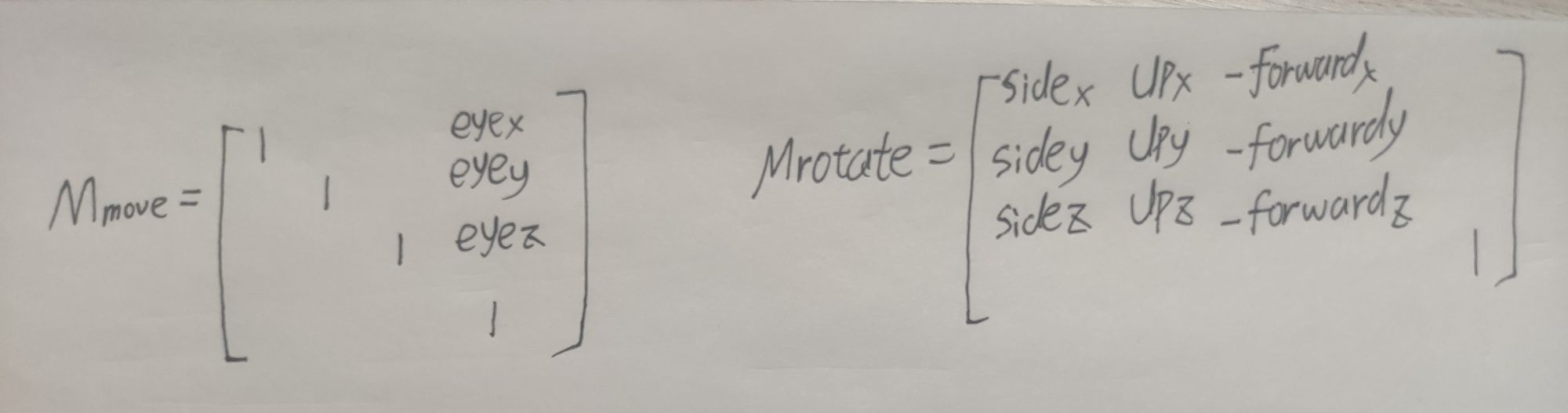
The translation and rotation matrices are shown below. The world-to-camera matrix is Mmove * Mrotate.
Here, what we know is a coordinate in the world coordinate system. What we want is the coordinate of that world-space point in the camera coordinate system. So we need the inverse of the matrix that transforms camera space to world space. The final matrix is shown below. It helps to view the matrix as a coordinate transform.
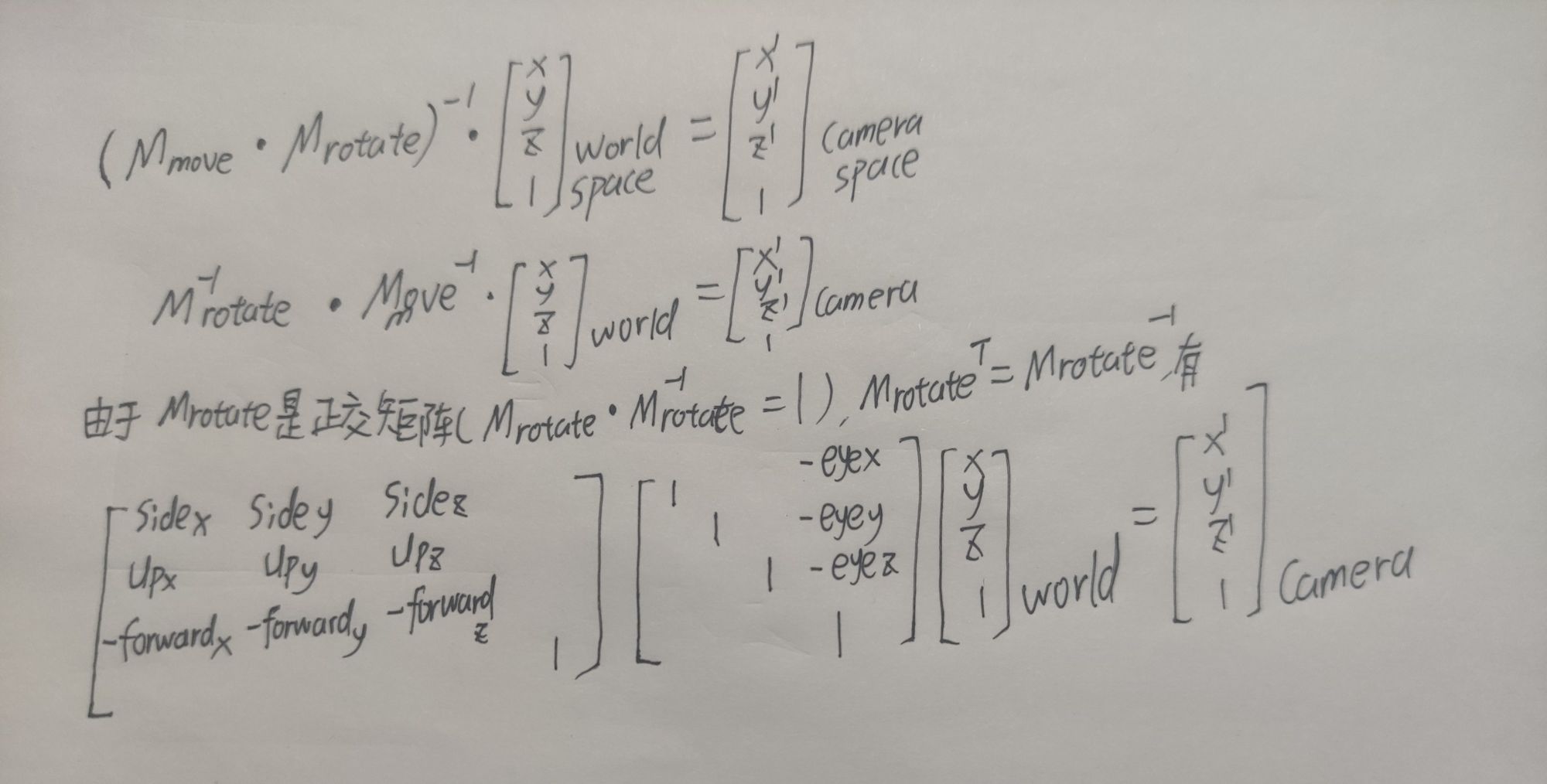
At this step, all z values become negative, and they need to be negated before continuing with correct computation.
2.4 Camera Space to Projection Space Matrix
The camera-space-to-projection-space transform is the process that eventually maps a 3D model onto a 2D viewport. It simulates the process of adjusting a camera’s focal length. I think this is the most troublesome and hardest-to-understand part among these transforms; I skipped the proof several times before. But after reading it a few more times, it becomes understandable. Do not give up on this proof.
Perspective Projection Explained is very well written. I understood this part by reading it. Here I write my own version to keep my notes complete.
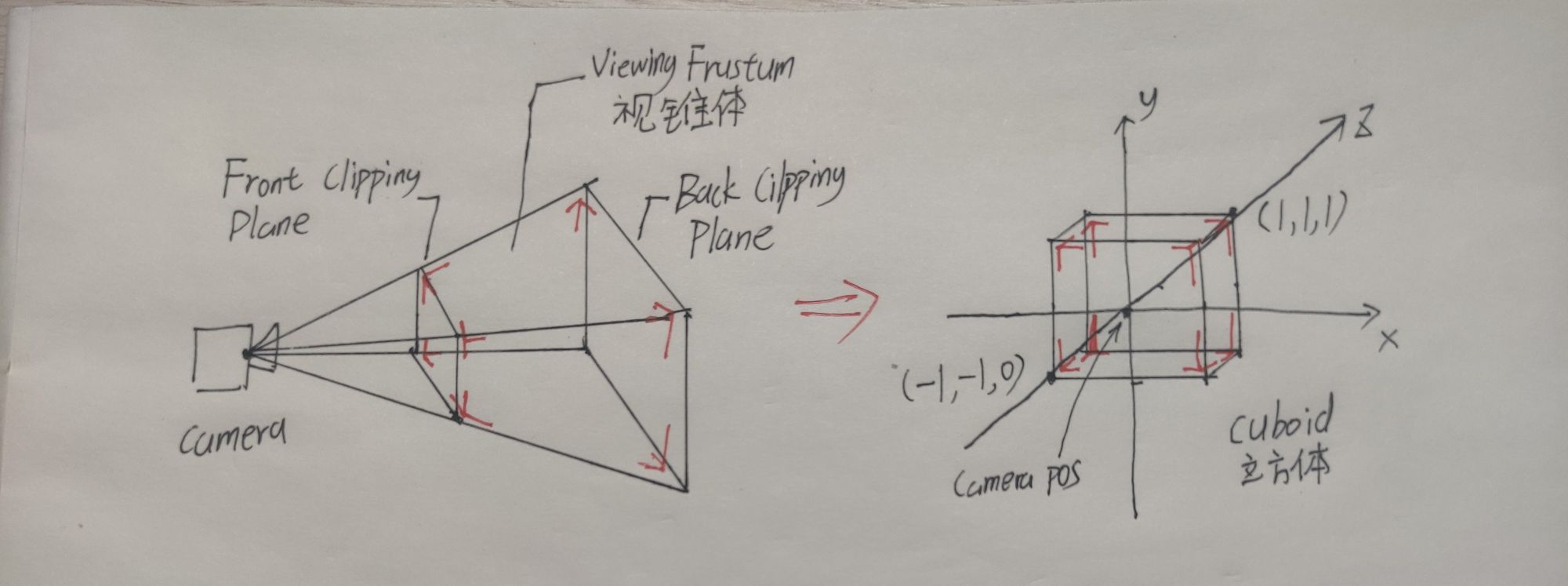
The whole transform maps a frustum region captured by the camera into a cuboid region. That cuboid is eventually transformed into a 2D image during viewport transformation.
The frustum region is the red-outlined part in the diagram. It is determined by the front and back clipping planes. Only 3D objects inside this region are captured and shown in the final image.
The cuboid is transformed from the frustum by enlarging the front part and shrinking the rear part. This produces the camera effect where nearby objects appear larger and distant objects appear smaller. In the cuboid, objects closer to the camera lie closer to the z = 0 plane. After the transform, the x range is [-1, 1], the y range is [-1, 1], and the z range is [0, 1].
The derivation can be split into two parts:
- Project points inside the frustum onto a clipping plane. I choose the front clipping plane here, though this is a personal choice; the back clipping plane can also be used.
- Transform points on the clipping plane into the cuboid region.
Detailed derivation:
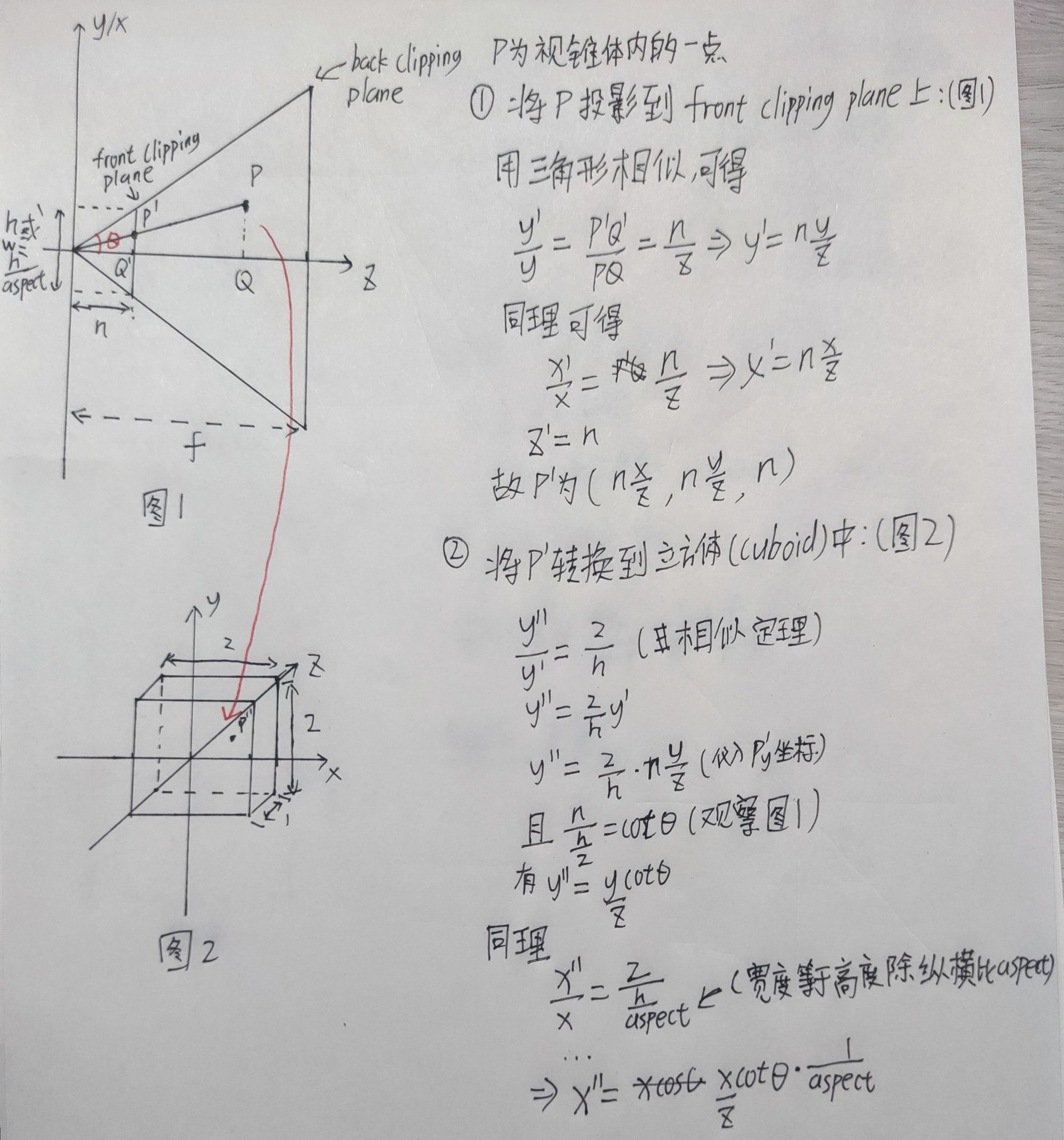
aspect is the width-to-height ratio.
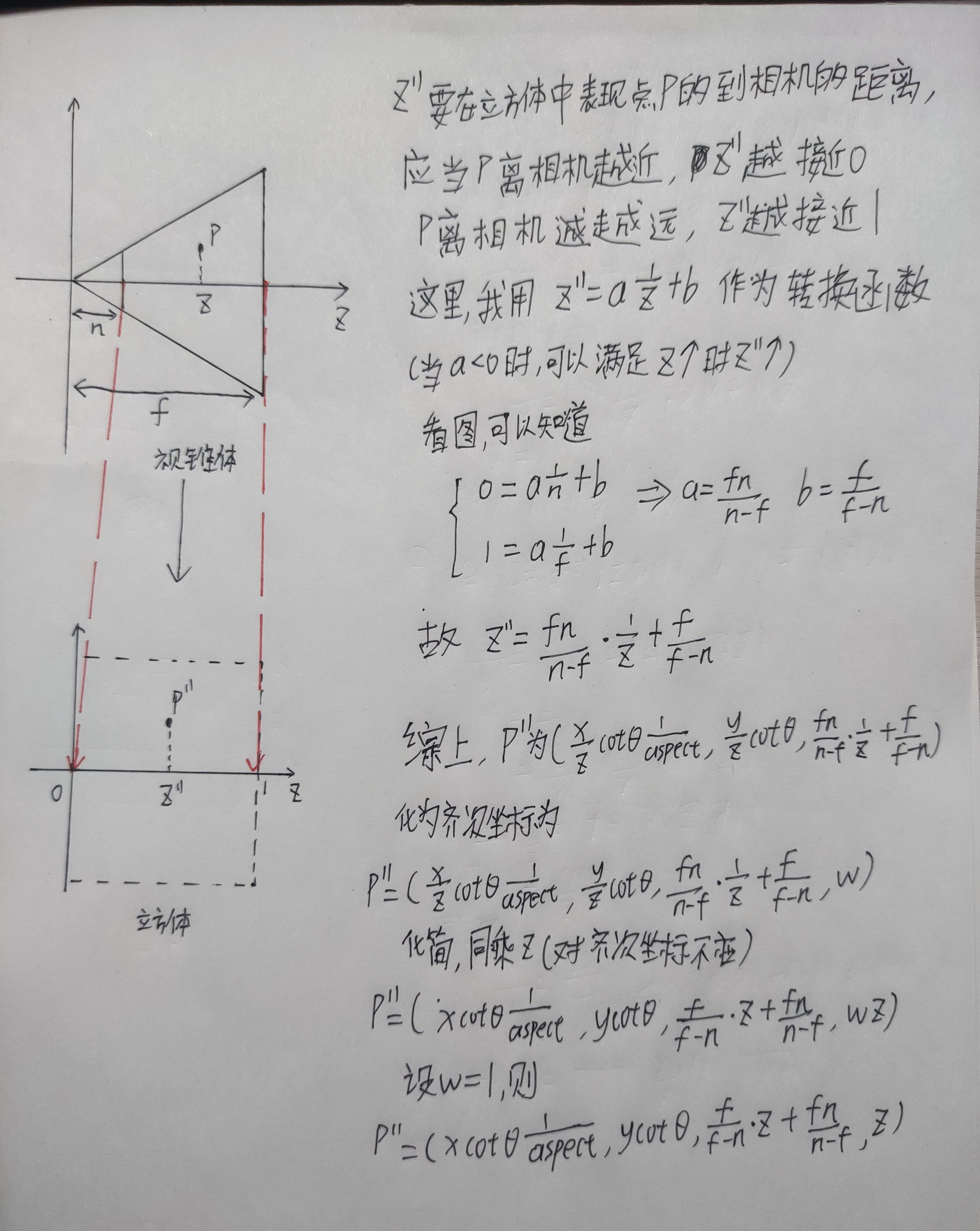
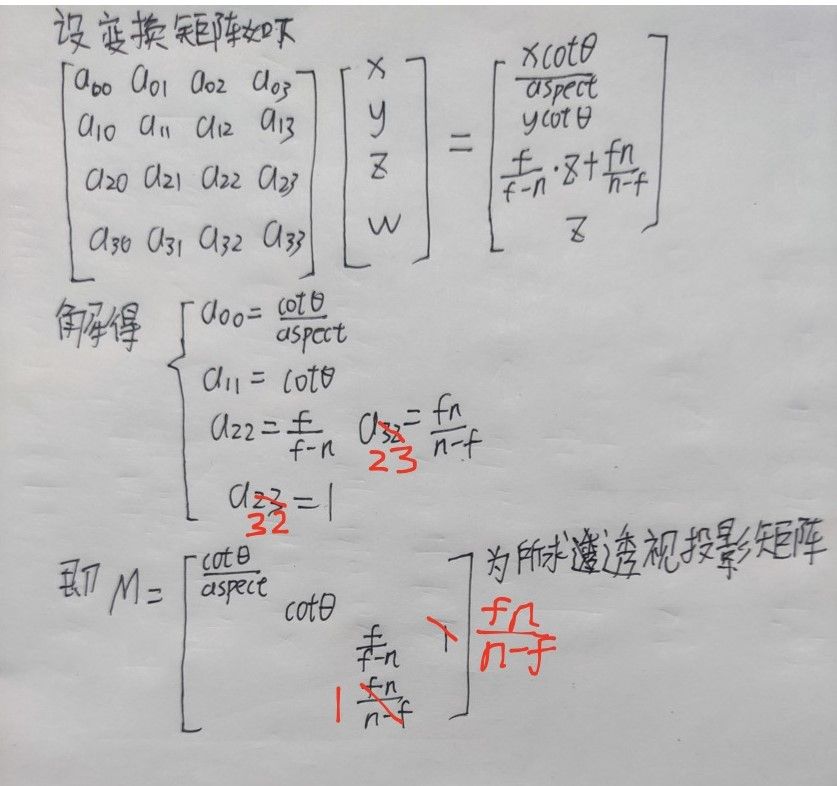
Note that w is not 1. The whole vector must be divided by w to place it on the w = 1 hyperplane before continuing.
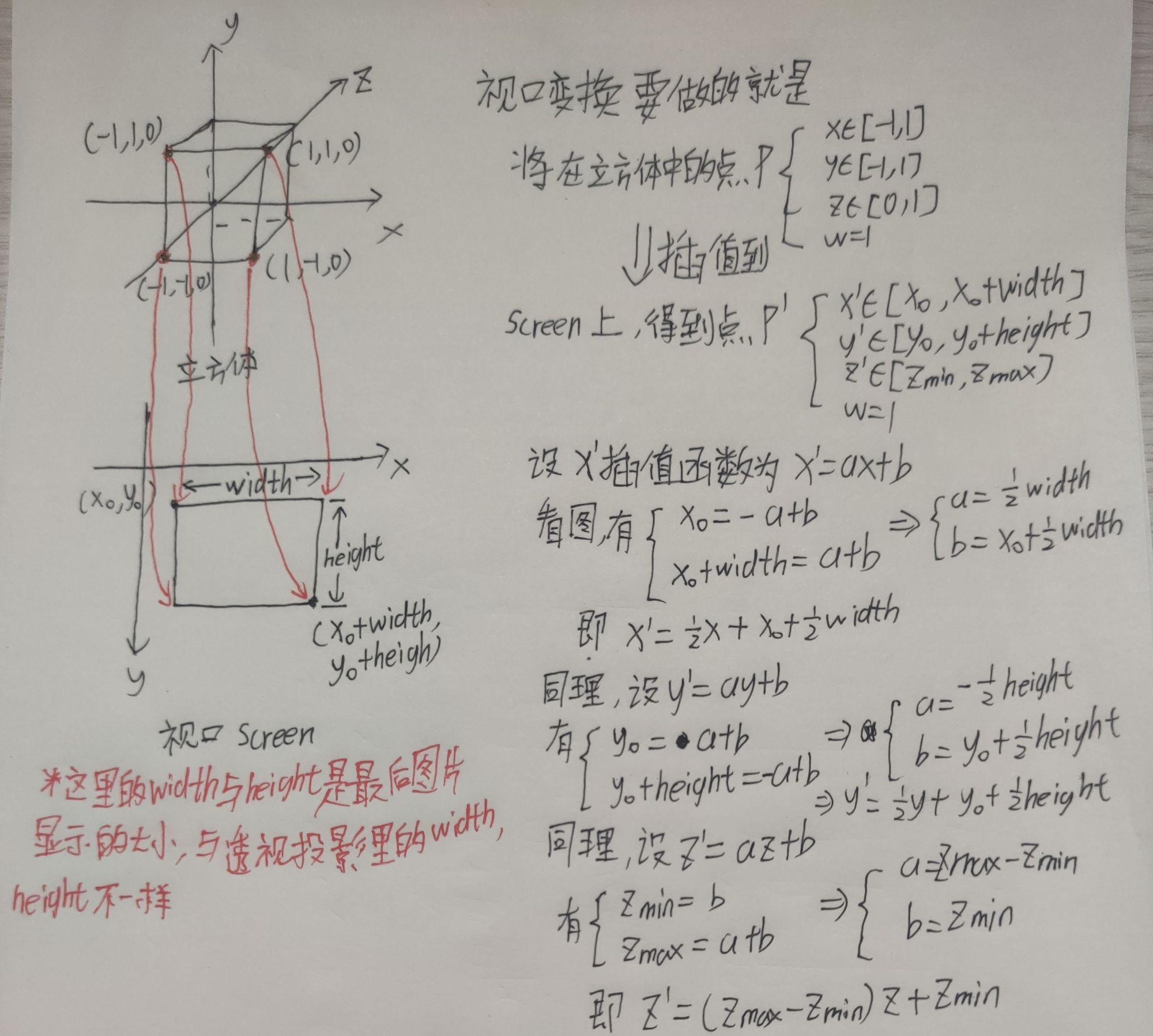
2.5 Projection Space to Screen Space Matrix
After the previous transform produces the cuboid, only this final step remains before obtaining the camera’s final image. This is also called the viewport transform.
2.6 Summary
At this point, all transform matrices are complete. Through these transforms, a 3D model can be converted into an image. Next, I will write a rasterization renderer using these matrices.
3. References
Matrix operations: four-dimensional homogeneous space
Graphics coordinate transform 1: object-to-world matrix
Shader Mountain 16: coordinate spaces and transform matrices
Perspective Projection Explained