Building a Computer with Nexys4 DDR [1]: Hardware
This is the basic hardware part of the computer.
Index
This project consists of multiple parts, so this may not be the first article you read.
- Overview
- Hardware
- Operating System
- Applications
1 Features
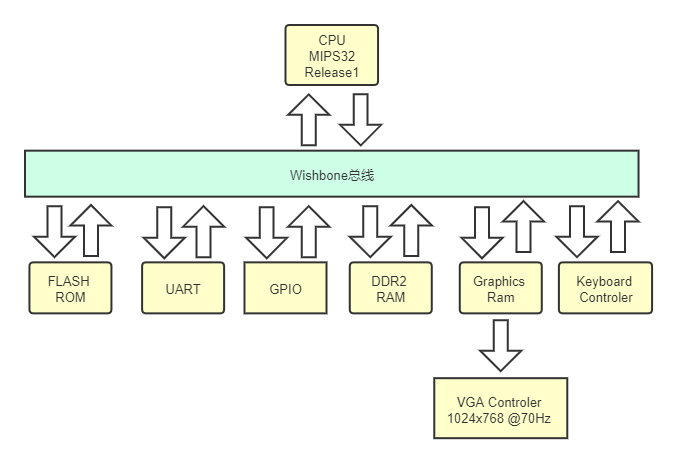
- CPU
- 50 MHz main frequency
- 5-stage pipeline
- 32-bit processor
- Supports addition, subtraction, multiplication, and division
- Supports kernel mode
- Uses the MIPS II instruction set
- Supports TLB paging cache, unfinished
- Supports cache, unfinished
- Memory
- Uses the DDR2 protocol
- Disk
- Uses the SPI Flash protocol
- Graphics
- Resolution and refresh rate: 1024x768 at 70Hz
- Can display ASCII text
- Bus
- Uses the Wishbone bus
2 SoC Structure
3 CPU Features
Supported instructions and functions:
lb/lh/lw: read a byte, half word, or word from memory into a register sb/sh/sw: store a byte, half word, or word from a register into memory add/addu: add the contents of two fixed-point registers sub/subu: subtract the contents of two fixed-point registers div/divu: divide the contents of two fixed-point registers mul/mulu: multiply the contents of two fixed-point registers and/andi: bitwise AND between two registers or/ori: bitwise OR xor/xori: bitwise XOR beq/beqz/benz/bne: conditional branch, equal, zero, not zero, or not equal j/jr/jal/jalr: direct jump or register jump lui: place a 16-bit immediate value into the upper 16 bits of a register and fill the lower 16 bits with zero sll/srl: logical left shift / right shift slt/slti/sltui: if the value of operand 2 is less than operand 3, set operand 1 to 1; otherwise set it to 0 mov/movz/movn: move;nmeans negative andzmeans zero trap: enter kernel mode according to the address vector eret: return from an exception to user mode
The CPU has 32 general-purpose registers:
0($zero): always returns 0 1($at): temporary variable used by the assembler 2-3(v0-v1): return values from subroutine calls 4-7(a0-a3): arguments for subroutine calls 8-15(t0-t7): temporary variables; subroutines do not need to save and restore them 16-23(s0-s7): subroutine register variables; a subroutine must save and restore the variables it uses before returning, so the caller knows these register values are unchanged 24-25(t8-t9): temporary variables; subroutines do not need to save and restore them 26-27(k0-k1): usually used by interrupt or exception handlers to save system parameters 28($gp): global pointer; some runtime systems maintain this pointer to accessstaticandexternvariables more conveniently 29($sp): stack pointer 30(s8/fp): the ninth register variable; subroutines can use it as a frame pointer 31($ra): return address for subroutines cp0: coprocessor 0; MIPS CPU control is handled through cp0
4 GitHub Repository
5 Demo Video
Homemade CPU and peripherals running Snake
6 Reference Books
[1] Lei Silei. Write Your Own CPU. Publishing House of Electronics Industry, Beijing, 2014.
[2] Noam Nisan, Shimon Schocken. The Elements of Computing Systems. Publishing House of Electronics Industry, Beijing, 2017.
[3] Kazutoshi Mizuguchi, Ryo Yonezawa, Hiroshi Fujita. Introduction to CPU Design. Posts & Telecom Press, Beijing, 2014.