Vulkan Real-Time Ray Tracing
This article introduces the process of implementing real-time ray tracing with Vulkan.
Vulkan is a low-overhead, cross-platform API for 2D, 3D graphics, and compute. Compared with OpenGL, it is lower level. Being lower level means there are more places where performance can be optimized, and it can provide better performance.
Ray tracing is a rendering algorithm in 3D computer graphics. It traces the path of light from the light source to objects, and then the reflected paths from those objects. Since computing all paths completely is very expensive, current ray-tracing techniques usually compute only the light paths that are visible to the eye.
Real-time ray tracing is not fundamentally different from ray tracing. It uses hardware acceleration, fewer samples, and shorter marching steps to reduce computation, eventually reaching real-time performance, meaning multiple frames per second. For details, see High-Quality Real-Time Rendering: Real-Time Ray Tracing.
Figure 1 compares real-time ray-traced reflections in Wolfenstein: Youngblood.
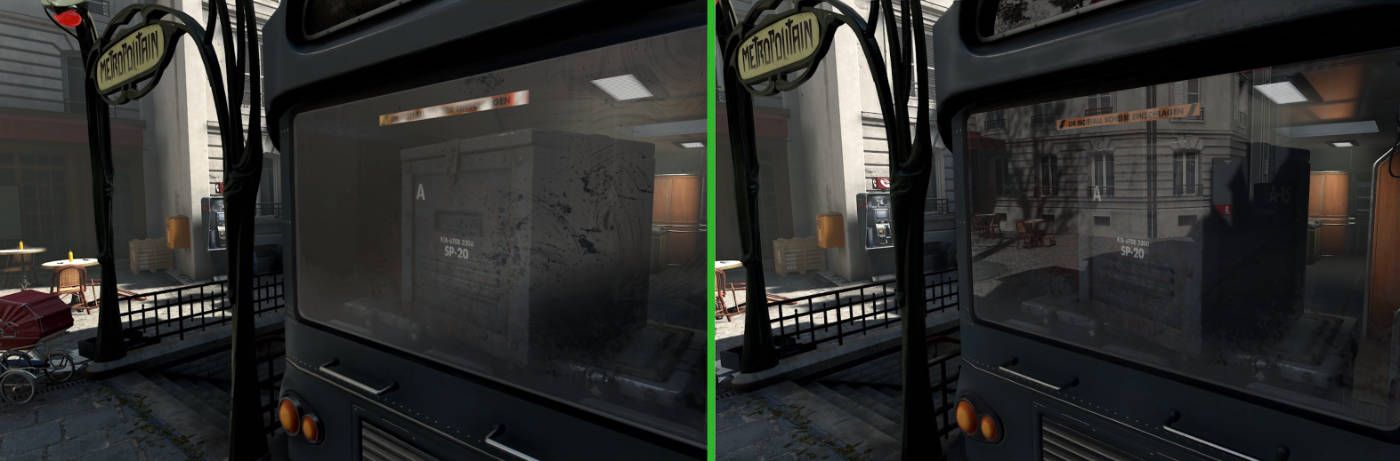
| Figure 1: reflections disabled on the left, ray-traced reflections enabled on the right |
|---|
Technical Route
- Learn Vulkan.
Process: learn basic Vulkan concepts through https://vulkan-tutorial.com/ and https://vkguide.dev/.
https://github.com/yufeiran/LearnVulkan
- Build a small framework that can render multiple objects.
https://github.com/yufeiran/miniVulkanRender
Vulkan: drawing multiple objects with dynamic uniforms
- Start learning ray tracing.
I plan to study tutorials such as NVIDIA Vulkan Ray Tracing Tutorials, then implement a small ray-tracing framework myself.
At the same time, I am learning the glTF format: https://github.khronos.org/glTF-Tutorials/gltfTutorial/
Hardware-Accelerated Ray Tracing Principles
I am interested in how GPUs implement hardware-accelerated ray tracing, so I looked up some materials and organized them into a PPT:
CSIG Competition Materials
Competition link:
Demo Video
Document
Renderer Implementation
After completing the competition, I also implemented my own renderer:
https://github.com/yufeiran/miniVulkanRenderer2
Reference Links
Principles
High-Quality Real-Time Rendering: Real-Time Ray Tracing
Deep Dive into GPU Hardware Architecture and Execution Mechanisms
Tutorials
NVIDIA Vulkan Ray Tracing Tutorials
AMD Hardware-Accelerated Ray Tracing Principles
https://zhuanlan.zhihu.com/p/337151778