MIT 6.828 / 6.S081 Fall 2020 Study Notes
Why Study This Course?
MIT 6.828 is a famous operating-systems course. To complete Building a Computer with Nexys4 DDR [2]: Operating System, I planned to go through it.

This course mainly consists of lectures and labs, with the labs being the core. So my study here is lab-oriented, using the lectures as reference while learning by doing.
The English xv6 book is here.
The Chinese version is here.
Content Overview
There are 11 labs:
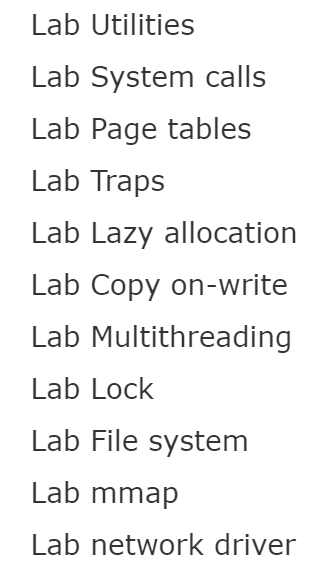
Plus environment setup.
Environment Setup

If installing Debian, you need to install the testing version, Bullseye. The QEMU version in Buster is too old to run the provided programs.
After installing Debian Bullseye, install QEMU and the GCC RISC-V toolchain. The script provided by the course can complete this in one line. Note that Fall 2019 used QEMU 4.x, while this script always installs the latest QEMU, already 5.x at that time, so make qemu in the Fall 2019 project may fail.
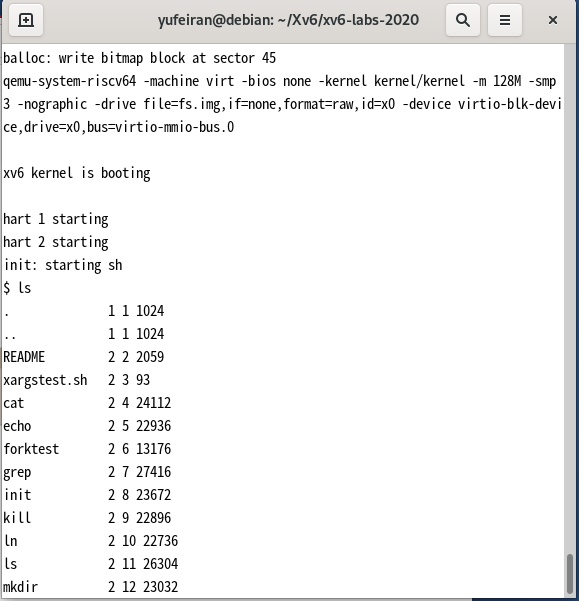
Finally, clone xv6, enter the directory, and run make qemu.
Lab 1: Utilities
Understand application-layer calls.
sleep
Put a process to sleep for n ticks. One tick is 100 milliseconds.
pingpong
Use fork and pipe to create a parent process and child process, and send data between them.
primes
Use fork and pipe to create multiple processes and compute prime numbers.
find
Find files under a specified directory.
xargs
Add pipe-like support for programs that do not support pipes directly.
Lab 2: Syscall
Understand how the kernel and user space interact through syscalls.
trace
Print syscalls within a selected range.
sysinfo
Print remaining system memory and the number of running processes.
Lab 3: Pgtbl
Understand page tables under the RISC-V architecture and how xv6 manages them.
vmprint
Print all PTEs, page table entries, in the page table and their physical addresses.
A kernel page table per process
An application’s userpagetable is stored sequentially from address 0 to sz, so copying PTEs from userpagetable to kernelpagetable only needs to follow the process size sz when computing addresses.
simplify copyin/copyinstr
After completing the previous step, this part becomes easier. The core is implementing a function that copies all PTEs from the user page table to the user’s kernel page table. The user page table spans addresses from 0 to sz * PGSIZE, so it can be copied page by page in order.
Be careful that virtual addresses must not exceed the PLIC address. PLIC is the interrupt controller under RISC-V, and exceeding this region will cause overwrite. Also, set the PTE_U flag of PTEs copied into the kernel to 0, so the operating system can access user-program data in kernel mode.
The tests for this lab are computationally heavy. If using a virtual machine, raise the VM configuration or increase the test timeout; otherwise the tests may time out.
Lab 4: Traps
The main learning goal is to become familiar with how xv6 handles interrupts and exceptions.
RISC-V assembly
This part is mainly for becoming familiar with RISC-V assembly instructions.
This RISC-V manual helps with understanding.
Backtrace
Implement a function that traces the error location.
Alarm
Implement a syscall that periodically calls a user function.
Lab 5: Lazy Page Allocation
Change xv6 page-table allocation from “allocate as many pages as requested” to “allocate a page only when the user program actually uses it”.
This improves xv6 runtime speed by reducing the number of allocated page tables.
Eliminate allocation from sbrk()
Modify sbrk() so it only changes the size of the user page table without actually allocating memory.
Lazy allocation
Modify interrupt handling, uvmalloc(), uvmunmap(), and related functions so that every page fault allocates one page table for the user program, while also ensuring that page-table removal works correctly.
Lab 6: Copy-on-Write Fork for xv6
This chapter implements the parent-child shared-memory page-table method described in the lecture notes. Although it has only one hard-level task, this part took me more than three days.
The hardest part was combining the lectures, the RISC-V reference manual, and xv6 source code to understand the whole process of process page-table allocation and release.
One pitfall I encountered: when implementing reference counting for releasing page tables, the decrement operation should be placed directly inside kfree(). If not, it is very hard to find all places where the reference count needs to be decremented, and usertests can produce errors that are difficult to locate.
Lab 7: Thread
Uthread: switching between threads
Implement a user-level thread.
Debugging xv6 with gdb
- In the xv6 root directory, open terminal 1 and run
make qemu-gdb. It prints a TCP address. - Open terminal 2 in the same location and run
gdb-multiarch.multiarchmeans cross-platform. If using ordinarygdb, the default architecture is usually the host architecture, often x86, but here we need RISC-V, so extra configuration is required. - In terminal 2, run
target remote:xxx, wherexxxis the TCP address printed in terminal 1. - Start debugging.
Using threads
Become familiar with Unix pthread functions. When implementing multithreading, use locks to prevent incorrect data writes.
Barrier
Use the pthread library to implement a barrier. In short, each thread waits inside this function until all threads have reached it, and then all threads wake up together. This uses the same principle as xv6’s sleep/wakeup.
Lab 8: Locks
This part introduces xv6’s locking mechanism, including spinlocks and sleeplocks.
Memory allocator
Change page-table allocation locks from one global lock for all CPUs to one lock per CPU.
Buffer cache
Change the Buffer lock from one shared global lock to multiple parallel locks using a hash function. The difficult part is changing the original bcache into a hash table.
Lab 9: File System
Become familiar with the xv6 file system.
Large files
Add a second-level index to inode data-block links. This design is almost identical to the ext2 file system I previously built in an operating-systems course project.
Symbolic links
Implement symbolic links, supporting up to 10 levels of iteration. This was my first time implementing this feature by hand; before this, I had only seen it in operating-system books.
Lab 10: mmap
Implement Unix mmap and munmap.
My own understanding is that mmap serves a role similar to write and read, but it can operate on data more conveniently and directly, without repeated write or read calls.
The difficulty is that these two functions must operate on both memory page tables and the file system, and they also need to consider locking.
Lab 11: Networking
Following the provided documentation normally is enough.
I passed this lab after switching network and computer devices.